- 1.The definition of Work Execution Assurance
- 2.Why task management failed — and why WEA is different
- 3.The three pillars of Work Execution Assurance
- 4.How Work Execution Assurance works in practice
- 5.Who needs Work Execution Assurance
- 6.Work Execution Assurance vs other software categories
- 7.The business impact of Work Execution Assurance
- 8.How to implement Work Execution Assurance in your team
- 9.Frequently asked questions
Every business that has ever used a task manager has experienced the same slow-motion disaster. The team is onboarded. The tasks are set up. The deadlines are entered. Everyone agrees this is finally the system that will keep things on track.
Six weeks later, half the team has stopped updating their tasks. Deadlines are passing without action. A client calls to ask where their follow-up is. The manager finds out about the problem in that phone call — not from the system, not from the team, but from the client.
This is not a people problem. It is a category problem. Task management software was built to record what you plan to do. It was never built to assure that you do it.
Work Execution Assurance is the category built to solve exactly that. And it changes everything about how teams — and the managers who lead them — operate.
If you arrived here from a search about missed deadlines: the practical explanation of why your current tool cannot fix this is in Your Team Is Missing Deadlines Even Though You Have a PM Tool. If your specific frustration is chasing the team for updates, read How to Stop Chasing Your Team for Status Updates.
The Definition of Work Execution Assurance
Work Execution Assurance answers one question that no other software category has ever reliably answered: is the work actually getting done, right now?
The definition has three distinct components, each of which separates Work Execution Assurance from every other software category:
| Word | What It Says | Why It Matters |
|---|---|---|
| Work | The actual tasks and actions that need to get done | Not employees, not people — the work itself. Zero surveillance connotation. |
| Execution | The doing — not the planning, not the recording | This is precisely where businesses fail. Planning is easy. Execution is hard. |
| Assurance | Certainty. A guarantee. Confidence that it will happen. | This is the ultimate value. Not features, not dashboards — assurance. |
Together, these three components deliver something no task manager, project management tool, or CRM has ever delivered: certainty. The certainty that the work will get done.
Why Task Management Failed — and Why WEA Is Different
To understand why Work Execution Assurance matters, you first need to understand the fundamental flaw in every tool that came before it.
The Passive Tool Problem
Task management software — Asana, Monday.com, ClickUp, Trello, and hundreds of others — was built on a single assumption that turned out to be wrong:
Every generation of task management software has tested this assumption. Every generation has arrived at the same conclusion: people do not consistently update their tasks, no matter how easy you make it.
This is not laziness. It is human nature. When a team member is juggling 12 client relationships, 40 open tasks, and 200 emails, updating their task management system is the lowest-priority action in any given moment. The work gets done — or it does not — and the system records whatever the person remembered to enter.
The result is that a task management system, in most real-world teams, ends up being a historical record of intentions rather than an accurate picture of reality. It tells you what people planned to do. It cannot tell you what is actually happening right now.
The Manager's Dilemma
This creates an impossible situation for managers. They have two choices:
- Trust the system — which means trusting data they know is incomplete, leading to false confidence and unpleasant surprises.
- Don't trust the system — which means chasing the team for updates, running status meetings, and micromanaging, which defeats the entire purpose of having a system.
Neither option is acceptable. Both are exhausting. And both leave clients at risk.
What Makes Work Execution Assurance Different
Work Execution Assurance is built on a different assumption entirely:
Instead of depending on team members to self-report, a Work Execution Assurance platform monitors behaviour and progress independently. It watches the tasks — their deadlines, their progress percentages, their last update times, their owners — and builds a continuously updated picture of what is actually happening, not what people have remembered to enter.
When a task is moving forward, the system is silent. When a task starts to drift — deadline approaching, no progress update, owner inactive — the system speaks. It does not wait to be asked. It surfaces the risk the moment it forms.
| Task Management Software | Work Execution Assurance | |
|---|---|---|
| Core assumption | People will update their tasks | The system monitors regardless |
| Information source | What people enter | What is actually happening |
| Manager awareness | Depends on checking the system | System alerts manager proactively |
| When problems surface | When someone reports them | The moment they begin to form |
| Dependency on users | Complete | Minimal |
| Guarantee provided | None — records only | Assurance — nothing slips undetected |
The Three Pillars of Work Execution Assurance
Work Execution Assurance rests on three structural pillars. Remove any one of them and you no longer have assurance — you have a more expensive version of the same passive tools that came before.
The engine. A Work Execution Assurance platform monitors every task in every project, continuously and automatically. Not once a day. Not when someone logs in. Continuously. This monitoring covers:
- Deadline proximity — how close is this task's deadline, and how does that compare to its current progress?
- Progress velocity — has this task been updated recently, or has it been static while the clock runs?
- Owner activity — is the person responsible for this task actively working on it?
- Structural integrity — does every task have an owner, a deadline, and a defined next action?
- Parent-child health — if a subtask is at risk, does the parent task reflect that reality?
Monitoring alone is not assurance. If the system watches everything but only tells you when you ask, you still have a passive tool. The second pillar transforms monitoring into assurance: the system tells you what it sees, without being asked. Proactive alerting means:
- When a deadline is approaching and a task has shown no progress — the manager is notified now, not after the deadline passes
- When a task has no owner assigned — the gap is flagged immediately, before it becomes an orphaned responsibility
- When a subtask is overdue — the parent task is escalated, so the manager sees the client or project at risk
- When a team member's portfolio shows multiple tasks drifting simultaneously — the manager sees a pattern, not just isolated incidents
The third pillar is what gives Work Execution Assurance its name. Monitoring and alerting create visibility. Structural accountability creates the guarantee. In a well-configured Work Execution Assurance environment:
- Every piece of work has a deadline — there is no ambiguity about when things are due
- Every piece of work has an owner — there is no ambiguity about who is responsible
- Every deadline is monitored — there is no window in which work can drift undetected
- Every manager has a cross-portfolio view — there is no team member whose work is invisible
The result is not just that problems are caught earlier. It is that the structure of the system makes certain kinds of failure structurally impossible.
How Work Execution Assurance Works in Practice
The theory is clean. The practice is what matters. Here is what Work Execution Assurance looks like inside a real team — for any kind of team.
What the Team Member Experiences
Every team member has full access to three views — My Tasks, Kanban, and the Gantt timeline — the same views the manager uses. In practice, teams often gravitate to the Gantt, where the full project timeline is visible and task bars are colour-coded by health status at a glance.
My Tasks shows every task they own across every project in a single prioritised list — colour-coded by urgency. Red means act now. Amber means act today. Green means on track. Kanban shows the same tasks organised by status, useful for understanding flow and what is blocked. Gantt shows the full project timeline — where each task sits relative to today, which tasks are behind, and how dependencies connect across the project.
When something changes — a task completed, a blocker resolved, a deadline updated — the team member updates it in the system. That update takes seconds. It is the only action required of them. Everything else flows from it automatically.
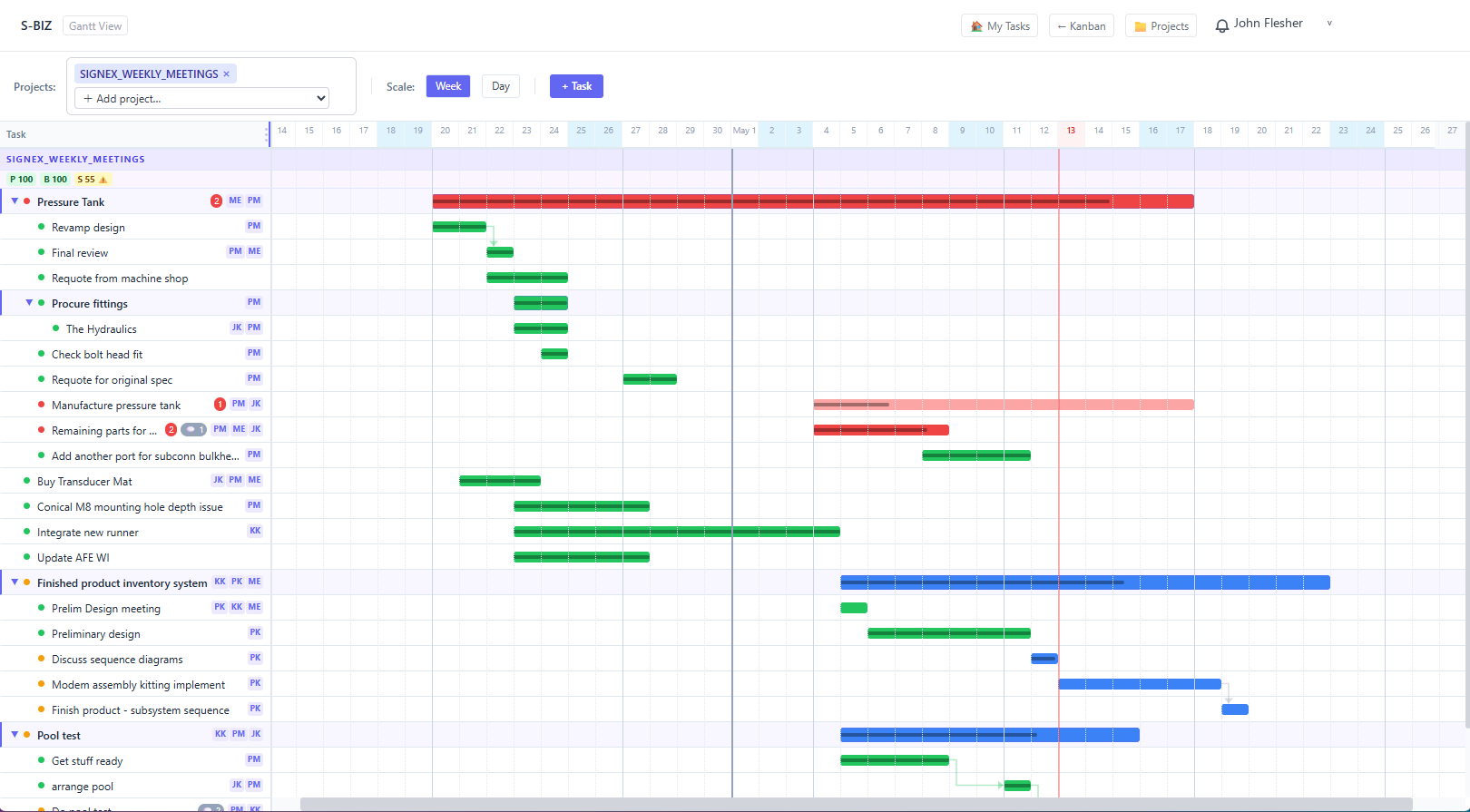
The Gantt timeline — used daily by both team members and managers. Task bars are colour-coded by health: grey for open, blue for on-track, green for completed, yellow for pending review, and pink-to-red for tasks with active violations. The darker the red, the more severe the problem. Click any task bar to open the full task detail and violation panel.
What the Manager Experiences
The manager opens the Gantt timeline or project view and sees the health of every project and every task simultaneously. They do not need to open individual tasks, ask for status updates, or run a progress meeting. Tasks with violations are visible immediately — flagged with the specific rule that fired and a recommendation for what to do about it.
When the system surfaces a violation, the manager acts on it. When the underlying issue is fixed — the owner assigned, the deadline extended, the blocker resolved — the violation clears automatically. There is no backlog of issues to manage. The system is always showing the current state of the work.
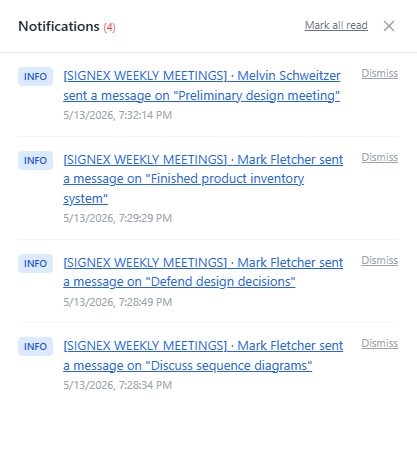
The notification bell lights up the moment a violation fires — for the task owner and the project manager simultaneously. Every notification links directly to the affected task. No polling, no email digest, no waiting for the next standup. The alert arrives the moment the problem starts to form.
The Violation Lifecycle
A violation is not an alert that sits in an inbox waiting to be dismissed. It is a live state indicator that reflects reality — and clears the moment reality changes.
| Stage | What Happens | Who Sees It |
|---|---|---|
| Violation fires | S-BIZ detects a rule breach — overdue task, missing owner, blocked task falling behind, deadline conflict | Relevant task owner and project manager, immediately via notification |
| Violation surfaces | Task is flagged in the Gantt, in My Tasks, and in the notification bell — with the specific issue and a recommended fix | Anyone with visibility of the affected task or project |
| Action taken | Owner assigned, deadline updated, blocker resolved, progress percentage moved forward — whatever the fix requires | The person responsible acts on the recommendation |
| Violation clears | S-BIZ re-evaluates the task automatically. If the rule no longer fires, the violation disappears — no manual dismissal required | Everyone sees the task return to green |
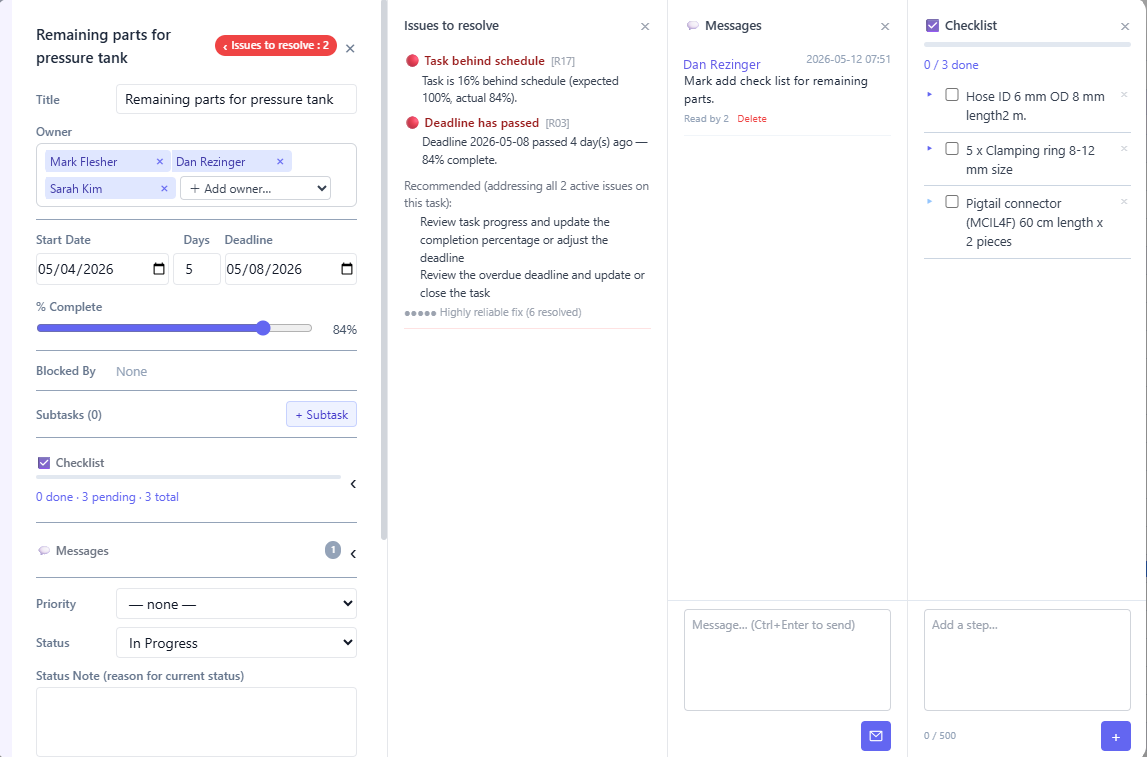
Every violation surfaces inside the task itself — with the specific rule that fired, a plain-language description of what went wrong, and a targeted recommendation for how to fix it. The reliability score shows how many times that exact fix has resolved the same problem before. No guesswork about what to do next.
The Same Mechanism Across Every Team Type
The mechanism is identical regardless of what the team does. What changes is the structure of the projects and tasks — not how the monitoring works.
| Scenario | The Violation That Fires | The Problem It Prevents |
|---|---|---|
| An engineer's task has been blocked for 6 days with no update | Long-blocked task — no progress since block was set | Sprint deadline missed without warning |
| A salesperson has a client task at 30% with the deadline tomorrow | Task behind schedule — trajectory won't meet deadline | Client not followed up; deal goes cold |
| A subtask deadline is set after its parent task deadline | Date conflict — child deadline exceeds parent deadline | Structurally impossible plan that nobody noticed |
| A task is created without an assigned owner | Missing owner — active task with no responsible person | Work that belongs to nobody and gets done by nobody |
| A consultant is assigned to critical tasks in three projects, all behind schedule simultaneously | Overloaded person — owner capacity exceeded across projects | All three clients feel the impact before anyone notices the cause |
Who Needs Work Execution Assurance
Work Execution Assurance delivers its greatest value when four conditions exist simultaneously: multiple ongoing relationships, multi-touch processes, high consequence of neglect, and essential manager oversight. When all four are present, Work Execution Assurance is not a nice-to-have — it is the difference between a business that retains its clients and one that slowly loses them to neglect nobody noticed.
What these businesses share is not their industry. It is their structural reality: a team of people, each managing multiple ongoing relationships, where the quality of follow-up determines whether clients stay or leave.
Work Execution Assurance vs Other Software Categories
WEA vs Task Management
Task management software records and organises work. It is a planning and recording tool. Work Execution Assurance monitors whether planned work is being executed. A task manager asks: "What needs to be done?" Work Execution Assurance asks: "Is it actually being done — right now?"
S-BIZ can operate alongside existing task management tools, or in place of them. Many organisations use S-BIZ as the accountability and monitoring layer that makes their existing task management investment finally deliver on its promise.
WEA vs Project Management
Project management software excels at managing complex, bounded initiatives with clear start and end dates. Work Execution Assurance is designed for ongoing operations — the continuous flow of client work, follow-ups, and relationship management that never has a defined end date. A law firm managing 200 active client matters does not need a project manager. It needs Work Execution Assurance.
WEA vs CRM
CRM software is a system of record — it manages customer data, deal stages, and communication history. Work Execution Assurance is a system of action — it manages the execution of client-facing work. These categories are complementary. Many organisations use their CRM for data and S-BIZ for execution accountability.
WEA vs Employee Monitoring
This distinction is critical. Employee monitoring software tracks what people do — websites visited, keystrokes, screenshots, mouse movement. Work Execution Assurance tracks what work is doing — whether tasks are progressing and deadlines are being met. It monitors the work, not the worker. There is no surveillance, no personal data captured, no screenshots. If work is moving forward, Work Execution Assurance is completely silent.
Read the full distinction: S-BIZ monitors work, not people →
The Business Impact of Work Execution Assurance
The value of Work Execution Assurance is measured in business outcomes, not software features. Organisations that implement it effectively report impact across three dimensions.
Client Retention
The leading cause of client churn in professional services is not bad work — it is the feeling of being neglected. Clients leave when follow-ups are slow, when they have to chase for things that should have been delivered. Work Execution Assurance makes client neglect structurally impossible. Every client has a monitored follow-up cycle. Every overdue touchpoint surfaces immediately. The account manager who forgets to follow up gets a prompt before the client notices.
Team Performance
Work Execution Assurance has a well-documented floor-raising effect on team performance. When team members know that task deadlines are being monitored in real time — not by a micromanaging supervisor, but by a system — their behaviour changes without any cultural intervention. Average performers, who previously had the option to drift, find that the system creates the structure their natural work style needed.
Management Efficiency
In a team without Work Execution Assurance, a significant portion of a manager's week is consumed by status gathering — asking people where things are, running progress meetings, chasing updates. Work Execution Assurance eliminates this entirely. The system provides the picture, continuously and accurately. The manager does not need to ask. They need only act on what the system surfaces.
How to Implement Work Execution Assurance
Implementation is simpler than most organisations expect. A team of 20 can be fully operational in under an hour. There is no data migration, no specialist consultant, no multi-month rollout. And because S-BIZ flags violations the moment they exist, the software guides you to a correct setup as you build — you do not need a manual.
Create a profile for each team member. They receive login credentials and immediately have access to their own task view. No configuration required on their end. The system knows who owns what from the moment tasks are assigned.
A project is a container for a body of related work — a client engagement, a product launch, an operational process, a sales pipeline. Each project has an owner, a deadline, and a set of tasks. Create one project per distinct body of work. A team member can own tasks across multiple projects simultaneously — S-BIZ monitors all of them.
Add tasks to each project. Assign an owner and a deadline to every task. Break large tasks into subtasks where work needs to be tracked at a finer level. Link dependencies where one task cannot start until another is done. As you build, S-BIZ flags any structural gap immediately — a missing owner, a deadline conflict, a dependency that creates an impossible timeline. You are done when there are no violations. The system is its own manual.
Open the Gantt or project view each morning. Review any violations surfaced since yesterday — act on red flags, note amber flags, ignore green. This takes 10 to 15 minutes and replaces an entire week of status meetings. Team members open My Tasks and know exactly what to work on today. No status meeting required.
S-BIZ Adapts to How Your Team Actually Works
The same four steps produce a different structure depending on what your team does. The monitoring engine works identically across all of them.
| Team Type | Typical Project Structure | What S-BIZ Watches |
|---|---|---|
| Software / Engineering | One project per product or sprint. Engineers assigned to tasks and subtasks across projects based on their role. | Blocked tasks, overloaded engineers, missed sprint deadlines, cascading dependency failures. |
| Sales Agency | One project per salesperson. Clients are top-level tasks. Required actions to close the sale are subtasks — each with a deadline and owner. | Clients with no recent activity, overdue follow-ups, deals stalling at a specific stage, salesperson portfolio health. |
| Professional Services | One project per client engagement. Deliverables are tasks. Individual work items are subtasks assigned to consultants or accountants. | Approaching regulatory deadlines, deliverables behind schedule, team members overloaded across multiple engagements. |
| Operations | Projects map to operational processes or recurring cycles. Tasks represent the steps; subtasks are the individual actions per cycle. | Process steps overdue, responsible person changed without reassignment, recurring deadlines approaching with no progress. |
Frequently Asked Questions
The Bottom Line
Every team that has tried to manage client work through a task manager has hit the same wall: the system depends on the people using it, and people are inconsistent. The work slips. The manager finds out too late. The client feels neglected.
Work Execution Assurance is the category built to solve this at a structural level. Not by making task management easier, or by adding more notifications to an already noisy inbox, but by changing the fundamental relationship between a management system and the truth of what is actually happening in a team.
The question is no longer "what needs to be done?" Task management has been answering that for twenty years. The question Work Execution Assurance answers is the one that actually determines whether clients stay or leave, whether businesses grow or stagnate, whether managers lead or chase:
That is what Work Execution Assurance provides. And it is a question no other software category has ever reliably answered.