S-BIZ vs Monday.com

Monday.com shows
what your team
entered. S-BIZ monitors
what is actually happening.

Monday.com has beautiful dashboards. The catch: every number on those dashboards depends on someone updating a column. The moment your team gets busy, the board drifts from reality.

S-BIZ evaluates the objective state of your work — not what people entered. The monitoring never stops. The violations fire whether or not anyone updates anything.

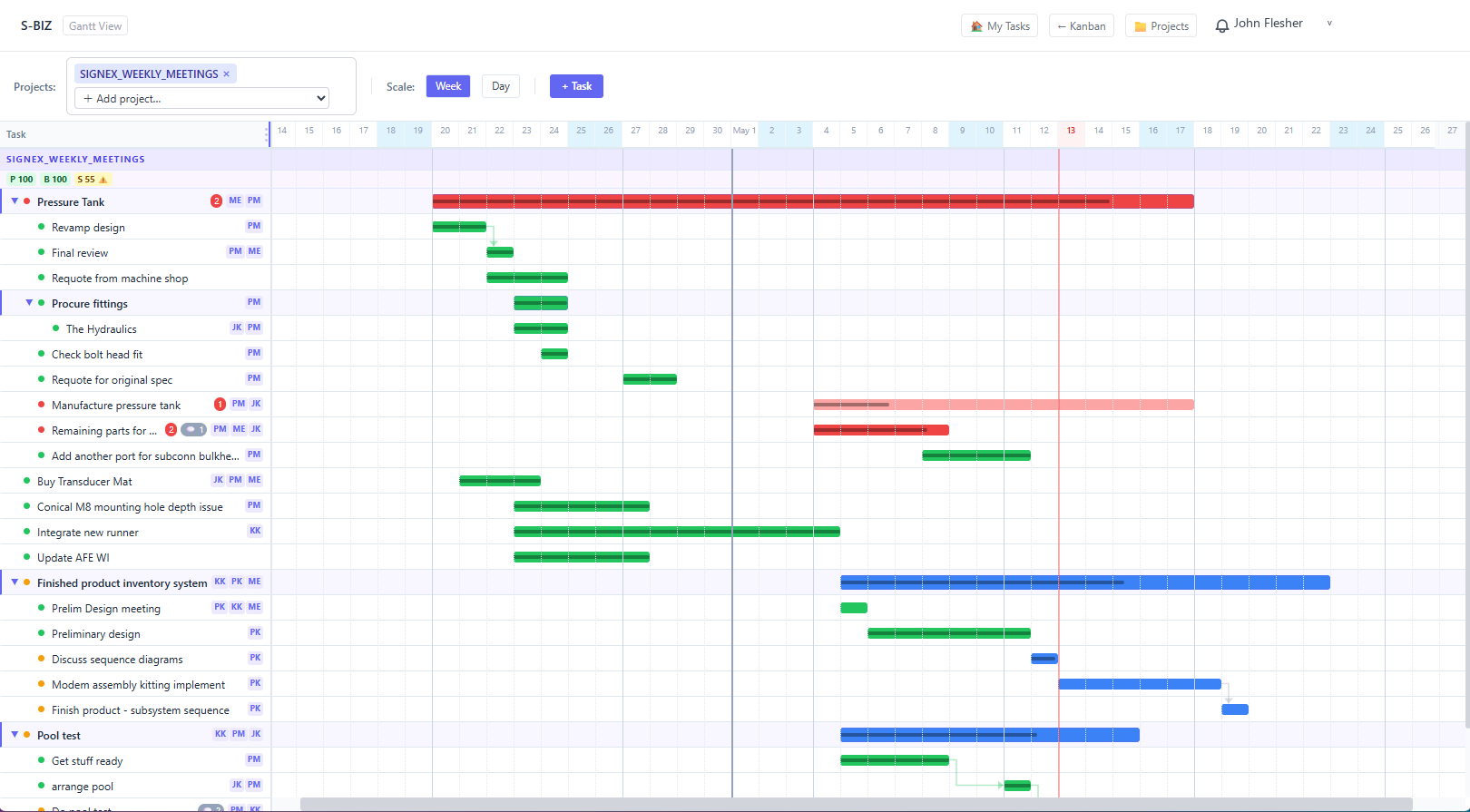
S-BIZ Gantt chart showing real-time project monitoring and violation detection
S-BIZ — Continuous monitoring
Every task is re-evaluated on every change. Violations fire automatically. No configuration required. No team updating required. The intelligence layer is always on.
Monday shows · S-BIZ acts · Work management vs Work Execution Assurance

Beautiful dashboards.
Garbage in, garbage out.

Monday.com's great strength is its flexibility. You can build boards for almost anything. The problem is that every board, every dashboard, every automation depends on people updating the system accurately.

When your team is under pressure — which is exactly when you need visibility most — people stop updating Monday. They are too busy doing the work to report on it. The board freezes. The dashboards look fine. Meanwhile, three tasks are behind pace, a blocker has gone quiet, and a deliverable has no owner.

Monday cannot detect any of this. It can only show you what your team told it. It has no independent view of the work's actual state. It is a mirror, not a monitor.

This is the fundamental limit of every passive tool — and Monday.com is the most elegantly built passive tool on the market. S-BIZ is something different. It is the first platform in the Work Execution Assurance category — software that monitors the work directly, not the reports about the work.

A dashboard that reflects what your team entered is a report. A system that monitors what is actually happening is assurance.
S-BIZ · Work Execution Assurance
What goes into Monday
Team member marks task "In Progress." Status column updated. Last updated: Monday morning.
What comes out of Monday — Thursday
Status: In Progress. Monday cannot tell you the task has not moved in three days. Dashboard shows green.
What goes into S-BIZ
Same task. Same "In Progress" status. No update since Monday morning.
What S-BIZ does — Wednesday
Violation fired: R17 — Task behind schedule. Completion percentage has not advanced. Deadline Friday. Owner notified. Manager notified. Two days to fix it.
What goes into Monday
Task created. Owner not assigned yet. Deadline set for next Tuesday.
What comes out of Monday — next Tuesday
Missed deadline. Nobody was responsible. Monday stored the task but never flagged the missing owner.
What goes into S-BIZ
Same task. Created without owner. Deadline Tuesday.
What S-BIZ does — immediately
Violation fired: R08 — Task without owner. Project lead notified. Owner assigned before the end of the day. Task delivered on time.
Monday.com vs S-BIZ —
what each tool actually does

Both tools manage work. The difference is whether they monitor it. S-BIZ is a Work Execution Assurance platform — a new category that goes beyond work management.

Capability S-BIZ Monday.com
Real-time continuous monitoring Evaluates every task on every change, automatically Displays what users enter — no independent evaluation
Proactive violation alerts Fires before deadlines, based on objective state Automations require manual configuration, depend on column changes
Works without team updating it Detects stale tasks and behind-pace work independently Entirely dependent on team entering accurate data
Violation auto-detection (16 rule categories) Missing owner, overdue, behind schedule, stalled, cascade No structured violation engine — automations are workarounds
Dependency cascade tracking Full upstream / downstream cascade, propagated automatically Dependencies link tasks visually — no cascade alerting
Actionable fix recommendations Specific HOW for every violation, with resolution count No structured guidance — automations can notify but not recommend
Derived project health Calculated from objective task state — cannot be manually overridden Status columns require manual updates — self-reported health
Zero-configuration assurance Monitoring starts from the first task — no automation setup needed Requires building automations, recipes, and dashboards to approximate monitoring
Structural validation during setup Flags structural errors the moment tasks are created No validation — structural issues are silent
Private database per company Dedicated, isolated instance — your data only Shared SaaS infrastructure
Violations auto-clear when resolved System re-evaluates and clears automatically on resolution No violation lifecycle — status must be manually updated

More configuration does not
equal more assurance.

Monday.com requires significant setup to approximate what S-BIZ does out of the box. But even after all that configuration, you get automations — not assurance. Here is the difference in practice.

Monday.com To get task-behind-schedule alerts
1
Add a progress column and train every team member to update it consistently
2
Build an automation recipe that triggers when progress drops below an expected threshold
3
Configure notification targets — who gets notified, when, at which threshold
4
Maintain it — update automations as team structures change; debug when they stop firing
!
Still depends on team updating progress — if nobody enters data, no automation fires
S-BIZ To get task-behind-schedule alerts
1
Create your tasks with owners, start dates, end dates, and completion percentages
2
Done. S-BIZ evaluates progress against elapsed time continuously. Violations fire automatically. No automation setup. No ongoing maintenance.
Monitoring starts from the first task you create.

What the intelligence layer
looks like in practice

Three views. One continuous monitoring engine. Every violation surfaces in the Gantt timeline, the Kanban, and in real-time notifications — without any configuration.

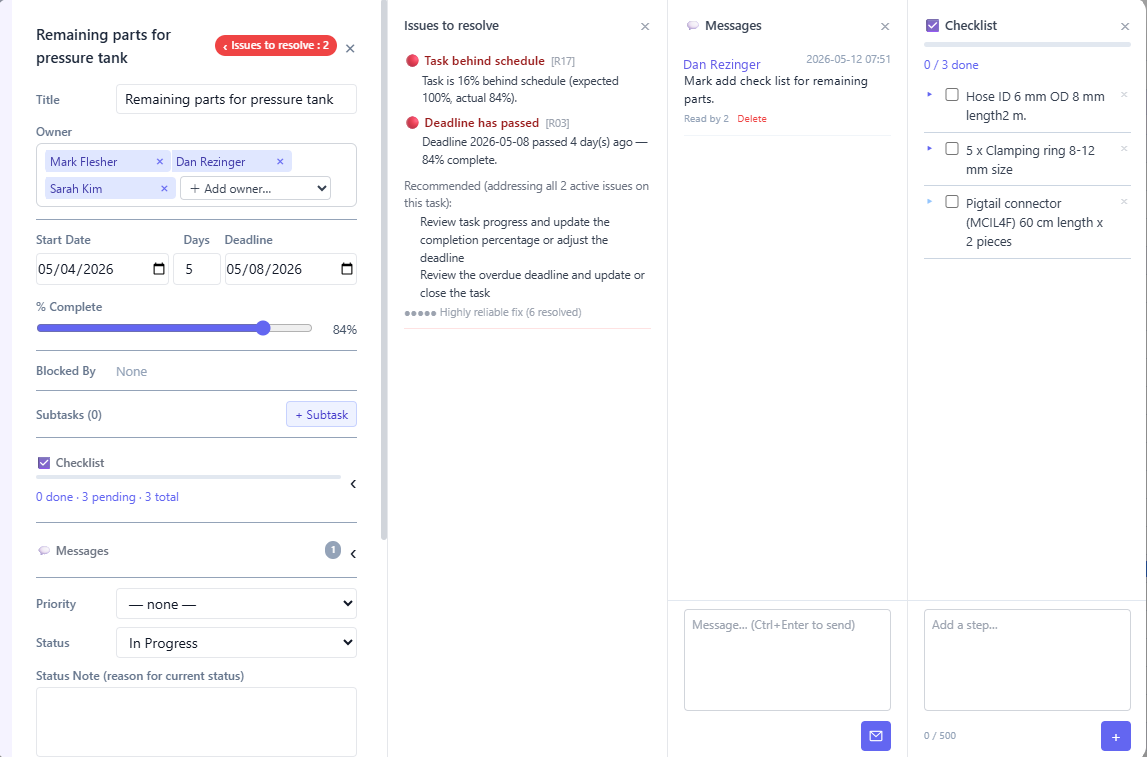
S-BIZ task modal showing violations and fix recommendations

The task modal surfaces every active violation with a specific, proven fix recommendation and the count of how many times that exact recommendation has resolved the same problem before.

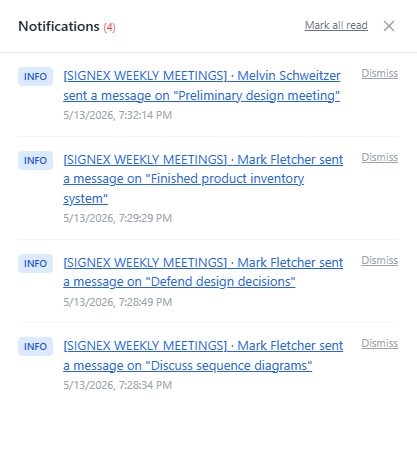
S-BIZ notification panel showing live violation alerts

Notifications fire the moment a violation is detected. The right person is alerted automatically — owner, manager, or both — based on the violation type and task assignment. No notification setup required.

The Addition Pitch

You do not have to
replace Monday.

S-BIZ runs alongside Monday.com as the accountability layer. Many teams use Monday for workflow, intake, and team collaboration — and add S-BIZ to do what Monday cannot: watch the work continuously and surface problems the moment they form.

The monitoring layer runs independently. It does not need Monday to send it updates. It evaluates the objective state of every task and project directly, in real time.

Over time, many teams find that S-BIZ replaces Monday for their project execution work — but you can start by adding it, not replacing it. Get the assurance layer running in under an hour.

Monday.com
Workflow management, intake, team communication, CRM-style boards
+
S-BIZ
Continuous monitoring, violation detection, real-time assurance — the layer that watches your execution

Monday shows.
S-BIZ acts.

If your team uses Monday.com and your dashboards still show green when the work is falling behind, S-BIZ is built to close that gap. Add the assurance layer and know what is actually happening — in real time.

We are accepting 5 companies into our founding cohort.
Try S-BIZ with your team fully supported. If you stay on, it is $5 per team member — locked in as your founding rate.

Up and running in under an hour · Full setup support included · Your data stored on a private, dedicated instance