S-BIZ vs Spreadsheets

Your spreadsheet knows
every deadline. It just
never tells you when
one is at risk.

Spreadsheets are the most honest passive tool ever built. They show exactly what you put in — and nothing else. They cannot watch. They cannot alert. They depend entirely on someone checking them at exactly the right moment.

S-BIZ is not a better spreadsheet. It is a different category entirely — a system that watches your work continuously and surfaces problems the moment they form.

Task Owner Deadline Status
Client proposal — draft Sarah K. May 19 In Progress
Design mockups v2 Mark F. May 21 In Progress
Legal review — contracts May 22 Open
Website copy — final Tom R. May 20 In Progress
QA — staging environment Priya M. May 23 Open
Today is May 22. Three tasks are overdue or at risk. The spreadsheet has not told anyone.
Spreadsheet: Shows "In Progress." Cannot detect that Sarah hasn't updated since Monday. No alert fires.
S-BIZ: Violation fired Tuesday. Owner notified. Manager alerted. Legal review flagged — no owner assigned. Still time to fix it.
Spreadsheets wait · S-BIZ watches · Passive record vs Active assurance

The most honest passive
tool ever built — and
that is exactly the problem.

A spreadsheet does not pretend to monitor your work. It records what you tell it and waits to be read. In that sense it is perfectly honest — it shows exactly what you entered.

The problem is that teams have come to rely on spreadsheets as operational systems. They use them to track deadlines, owners, and progress across projects involving five, ten, or twenty people. And at that scale, the spreadsheet's honest passivity becomes a structural failure.

Nobody can check the spreadsheet at exactly the right moment. The busy period — the one where tasks slip, owners go quiet, and deadlines drift — is precisely the period when nobody is looking at the tracker. The spreadsheet captures the failure only after someone opens it. By then it is usually too late.

S-BIZ is the first platform in the Work Execution Assurance category. It does not wait to be opened. It evaluates the objective state of every task continuously — and alerts the right people the moment something starts to slip.

A spreadsheet captures a failure at the moment someone opens it. S-BIZ detects it the moment it forms.
S-BIZ · Work Execution Assurance
What a spreadsheet actually does
Stores the data you enter
Shows it back when you open it
Calculates whatever formulas you've built
What a spreadsheet cannot do
Detect that a task is behind pace when nobody has updated it
Alert an owner the moment their task goes overdue
Trace what happens downstream when one task slips
Flag that a task has no owner and a deadline approaching
Tell you what to do about any of these problems

If any of these sound
familiar, your tracker has
already stopped working.

None of these are team failures. They are structural failures of a tool that was never designed to do what you need it to do.

You find out about missed deadlines from clients
Your tracker had the deadline. Nobody looked at it at the critical moment. The client looked at the calendar instead. The damage was done before you knew there was a risk.
You run Monday morning check-ins just to read the sheet
Your standup exists to find out what the spreadsheet should already be telling you. The meeting is a workaround for a passive tool. S-BIZ makes that meeting a decision session, not a status reading.
Nobody updated it over the weekend
Monday morning the sheet looks the same as Friday afternoon. Three things changed over the weekend — nobody recorded them. The sheet is already behind reality before the week starts.
You have multiple versions with conflicting data
"Tracker_v3_FINAL_revised.xlsx" — the version problem. Spreadsheets are static files. When five people share one, it fractures. Each person's version is the truth from their perspective.
High performers update it — stretched team members don't
Disciplined people keep the sheet current. Under-pressure people focus on the work and skip the reporting. The sheet becomes an accurate picture of the organised people and a black hole for everyone else.
You cannot see when a task slipped without a meeting
The sheet shows the current status. It does not show the trajectory. A task marked "In Progress" for fourteen days with the deadline tomorrow looks identical to one that just started. The spreadsheet has no sense of momentum.

Spreadsheet vs S-BIZ —
what each tool actually does

This is not a fair fight between equals. It is a comparison between a static record and a live monitoring system. S-BIZ is a Work Execution Assurance platform — a category that did not exist before S-BIZ.

Capability S-BIZ Spreadsheet
Continuous task monitoring Evaluates every task automatically on every change Static — shows what you entered when you last saved
Real-time violation alerts Fires the moment a rule breaks — owner and manager notified No alerts — waits to be opened and read
Detects tasks behind schedule Compares completion against elapsed time — fires violation automatically Cannot detect pace — only records status
Flags tasks without owners Immediate violation — project lead alerted Stores empty cell — no detection
Dependency cascade tracking Full upstream / downstream mapping, automatically propagated No dependency concept — each row is independent
Actionable fix recommendations Specific HOW for every violation with resolution count No guidance — you see the data and figure it out
Gantt timeline view Built-in — project timelines with violation colour-coding Manual construction — no live updates
Single source of truth One system, one live state, no version conflicts Version fragmentation inevitable with more than one editor
Works regardless of team discipline Detects objective state — independent of what people enter Entirely dependent on team keeping it current

What replaces the
spreadsheet in practice

S-BIZ gives your team a Gantt timeline, Kanban board, and personal task view — all with a live monitoring layer that watches the work and alerts the right people the moment something needs attention.
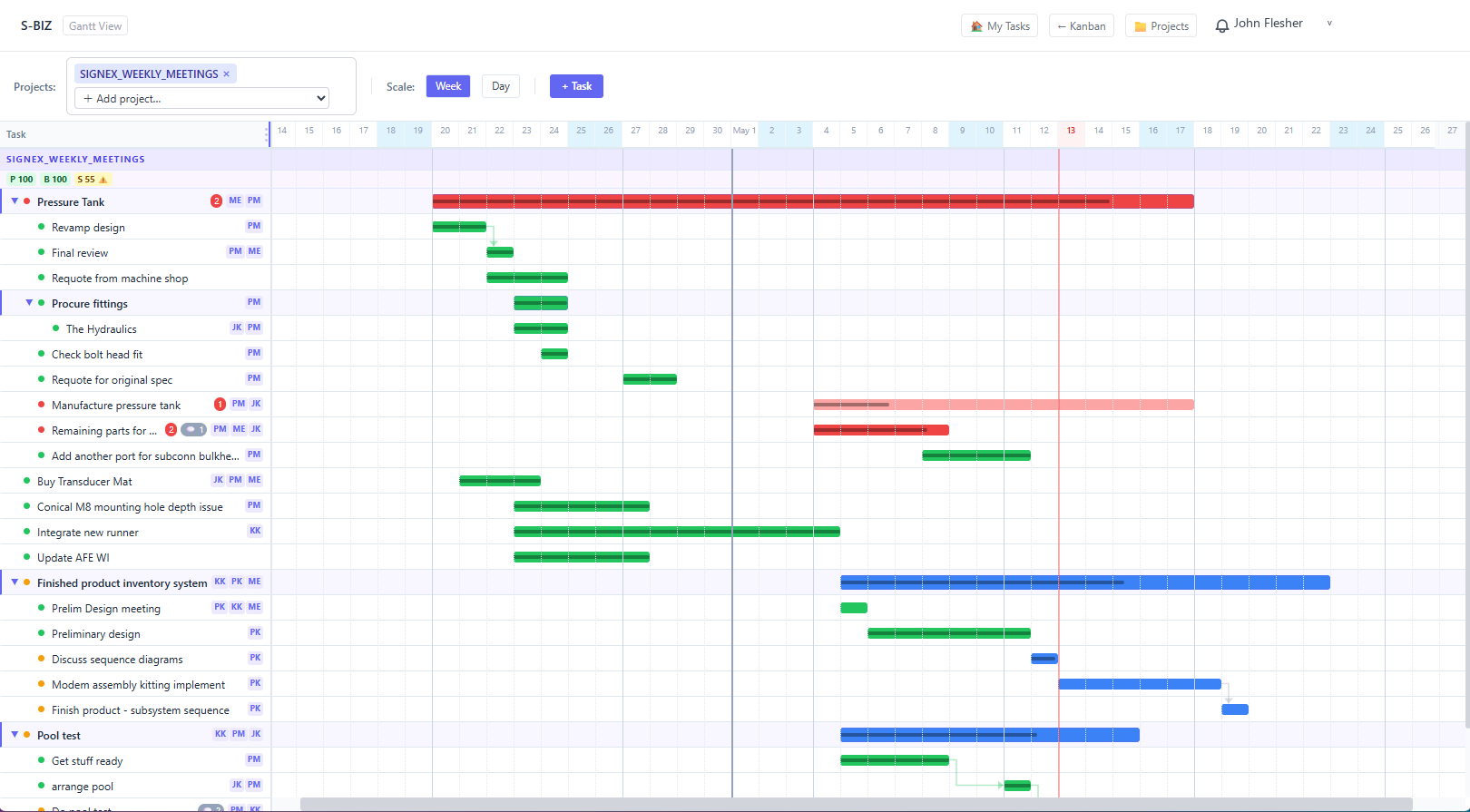
S-BIZ Gantt timeline showing project tasks with colour-coded health and violation flags

The Gantt timeline replaces the date-column in your spreadsheet — but it does far more. Task bars are colour-coded by health in real time. Pink-to-red signals a problem; the darker the red, the more severe. Every row is a live object, not a static cell. Click any bar and the full violation detail opens immediately.

From spreadsheet to
assurance — in one day.

Moving from a spreadsheet to S-BIZ does not require a project. Every row in your spreadsheet maps directly to a task. The monitoring begins the moment your first task is created.

1
Map your spreadsheet rows to tasks
Every row in your tracker becomes a task in S-BIZ. Task name, owner, start date, end date, and completion percentage — the same fields, now in a live system.
2
Set up your project structure
Group tasks into projects. If your spreadsheet has tabs per project, each tab becomes a project in S-BIZ. Set dependencies between tasks where they exist.
3
Assign owners and invite your team
Each team member gets an account. Tasks are assigned. The system immediately knows who is responsible for what — and will alert them directly when a violation fires.
4
Monitoring begins immediately
From the moment your first task exists, S-BIZ is watching it. No configuration. No automation setup. No training sessions. The intelligence layer is on from day one.
Your spreadsheet column S-BIZ field
Task / Item name Task name
Owner / Assigned to Owner (with alerts)
Due date / Deadline End date (monitored)
Start date Start date
% complete / Progress Completion % (evaluated)
Status Status + derived health
Blocked by / Depends on Dependency (cascade-tracked)
Tab / Sheet name Project
Less than a day. With full setup support included in the founding cohort, your team will be monitoring live work in S-BIZ the same day you apply.

Spreadsheets wait.
S-BIZ watches.

Your spreadsheet will never tell you a deadline is at risk. S-BIZ will — the moment it forms. Replace your tracker with a system that watches your work, not one that waits to be read.

We are accepting 5 companies into our founding cohort.
Try S-BIZ with your team fully supported. If you stay on, it is $5 per team member — locked in as your founding rate.

Up and running in under an hour · Full setup support included · Your data stored on a private, dedicated instance